Projector vs. Big Screen TV: Which One Actually Works for Your Basement?
Published August 2026 · By Dan, SmartHome Connect LLC · Lenexa, KS
Two summers ago I installed a beautiful 4K projector and 120-inch screen in a basement in Shawnee. Textbook install — ceiling mount, in-wall wiring, motorized screen. Last spring, the same homeowner called me back to take it out and hang an 85-inch TV in its place.
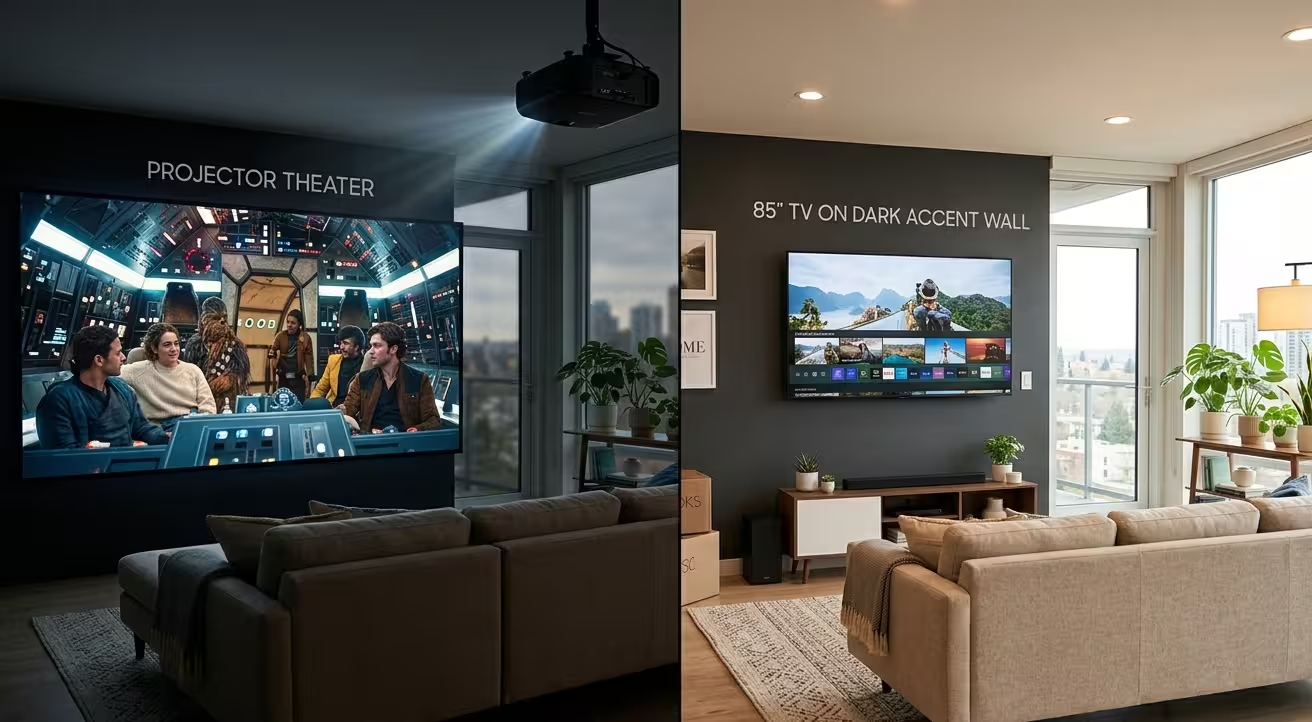
Nothing was wrong with the projector. What was wrong was the assumption behind it: that the basement would be a movie room. In practice, it became the kids’ gaming room, the Sunday football room, and the treadmill-while-watching-news room. All daytime uses. All lights-on uses. The projector spent a year looking washed out and gray, and the family stopped going downstairs to watch anything.
That job changed how I talk about the projector vs TV decision. The right answer isn’t about the gear — it’s about an honest audit of how the room will get used.
The Case for a Projector
Size per dollar, and it isn’t close. A quality 4K projector plus a 120-inch screen runs $2,500-$4,500 installed. The largest consumer TVs — 98-inch panels — start around $3,000 and climb toward $10,000 fast, and nothing affordable exists above that. If you want a truly theatrical image, projection is the only realistic path.
And the theatrical experience is real. A 120-inch image in a dark room with surround sound isn’t “like” a movie theater — it functionally is one. Movie nights become events. Kids invite friends over for it. For families who genuinely use a dedicated theater room at night, no TV replicates that scale.
The Case for a TV
Light immunity. A TV looks perfect at noon with every light on. A traditional projector needs darkness the way film cameras needed darkrooms — any ambient light lifts the blacks and grays out the whole image. Basements with window wells, walkout doors, or families who watch during the day fight this constantly.
Zero maintenance. TV panels run a decade without attention. Projector lamps dim over 3,000-5,000 hours and cost $100-$300 to replace; laser models last longer but degrade too. Projector fans hum. Filters collect dust. TVs just… turn on.
Instant gratification. Press power, picture appears. Projectors warm up, sync, and occasionally decide the HDMI handshake needs renegotiating while your guests wait.
Better HDR. At the same price point, a QLED or OLED panel delivers contrast and peak brightness that projection can’t touch. Sports, gaming, and HDR movies are simply more vivid on a good panel.
The Five-Question Audit I Run With Clients
Can the room go fully dark at 2 PM on a Saturday? If no — TV, conversation over. Will anyone game or watch daytime sports down there? TV. Is this genuinely a nighttime movie room, and does another TV exist upstairs for daily viewing? Projector becomes viable. Is 100+ inches the whole point of the project? Projector. Do you want to never think about the equipment again? TV.
Most Kansas City basements I walk through answer that audit as multi-purpose rooms. That’s why I install more 85-inch TVs than projectors — not because projectors are worse, but because most basements aren’t theaters. They’re second living rooms that occasionally show movies.
The Middle Path Nobody Mentions at Best Buy
Ultra-short-throw (UST) projectors changed this conversation. They sit on a console inches from the wall — no ceiling mount, no cable run across the room — and pair with ambient-light-rejecting (ALR) screens engineered to reflect projector light toward you while absorbing room light.
A UST with a 100-inch ALR screen runs $3,000-$5,500 installed, and it holds a watchable picture with moderate room light. Not TV-bright, but genuinely usable for a Sunday afternoon game. For homeowners torn on the projector vs TV question who won’t give up on size, UST is the compromise that actually works. I’ve installed three this year, all in walkout basements that couldn’t go fully dark, and all three families are happy.
One caution on the UST path: the screen matters as much as the projector. Pairing a UST with a standard white screen or a bare wall throws away the ambient-light advantage — the ALR surface is engineered specifically for the steep upward angle a UST projects at, and it’s the component doing the light-rejection work. Budget for the screen as a fixed cost, not an optional extra. I’ve been called to “fix” two washed-out UST setups where the only problem was a $200 pull-down screen doing a $900 ALR screen’s job.
What I’d Put in Your Basement
Multi-purpose room — kids gaming, football Sundays, movie nights: an 85-inch TV with a calibrated surround system. It handles every scenario without asking the room to change. I covered speaker placement for basement rooms in my surround calibration post.
Dedicated theater with lighting control: projector, 120-inch screen, in-ceiling surround, and the full home theater treatment. When the room’s mission is movies, projection earns its tradeoffs.
Walkout basement that can’t go dark but wants big: UST projector with ALR screen.
Not sure which describes your space? The light audit takes me fifteen minutes in person and costs nothing — I’ll tell you which setup your basement can actually support before you spend a dollar on gear. Reach me at (913) 674-9723 or smarthomeconnectllc.com/contact-us.
Serving Lenexa, Overland Park, Olathe, Shawnee, Leawood, and the full KC metro.