How Staring at a Bright Screen in the Dark Is Ruining Your Eyesight
There is a ritual that happens in almost every home when it is time to watch a great movie. You make the popcorn, you sit down on the most comfortable spot on the couch, and you turn off every single light in the room. The goal is to recreate the immersive, pitch-black environment of a commercial movie theater right inside your living room.
For the first twenty minutes, it feels incredibly cinematic. But as the movie progresses, you might start to notice a subtle discomfort. You begin rubbing your eyes. You might feel a dull headache forming right behind your forehead. By the time the credits roll, your eyes feel dry, heavy, and completely exhausted.
Many people blame their age or assume they just need reading glasses. However, the real culprit is usually the environment itself. Watching a modern television in complete darkness is one of the worst things you can do for your visual health. At Smart Home Connect, we believe your entertainment should never cause you physical pain. Here is the biological reason behind your eye strain and the professional techniques you can use to eliminate it forever.
The Biological Reason Your Eyes Ache After a Long Movie Marathon
To understand why this happens, we need to take a quick look at human anatomy. Your eyes are equipped with a brilliant, automatic aperture system called the pupil. The sphincter pupillae muscle constantly expands and contracts the pupil to control exactly how much light enters your eye.
When you walk outside on a sunny Kansas City afternoon, your pupils shrink to tiny dots to protect your retinas from the overwhelming brightness. When you step into a dark closet, your pupils dilate widely to let in as much light as possible so you can see your surroundings.
The problem occurs when you mix these two environments together. When you sit in a pitch-black room, your brain tells your pupils to open up as wide as possible. But directly in front of you is a massive, incredibly bright television panel pushing out intense light.
During a movie, the scenes change constantly. One second you are watching a dark, shadowy conversation in a cave, and your pupils dilate. The next second, the scene cuts to a bright explosion or a sunlit desert, and your pupils desperately scramble to shrink down. This constant, aggressive flexing of the eye muscles over a two-hour period causes severe muscle fatigue. That fatigue is the direct cause of the headaches, dry eyes, and blurred vision you experience at the end of the night.
Why the Technology Behind Your Display Changes Your Visual Comfort
Not all televisions are created equal when it comes to eye strain. The underlying technology of your screen plays a massive role in how much light is blasted into your dark room.
Traditional LED and QLED televisions use a powerful backlight system. To create bright colors, these panels push a massive amount of light through the pixels. In a dark room, even the black areas of the screen on a lower-end LED TV will emit a grayish glow because the backlight is always running. This constant barrage of light forces your eyes to work overtime.
On the other hand, OLED technology works very differently. OLED panels do not have a master backlight. Instead, every single pixel generates its own light. When a scene calls for perfect black, those specific pixels actually turn themselves off completely. This creates infinite contrast without flooding the room with unnecessary ambient light.
If you are someone who suffers from chronic eye strain and you primarily watch television at night, the type of screen you buy matters immensely. We highly recommend reading our detailed breakdown to understand which television technology is best for you between LED, OLED, and QLED models.
The Science of Bias Lighting and How It Saves Your Vision
Professional video editors and Hollywood colorists stare at monitors in dark rooms for twelve hours a day. They do not suffer from the same eye strain that the average consumer does because they utilize a crucial tool known as Bias Lighting.
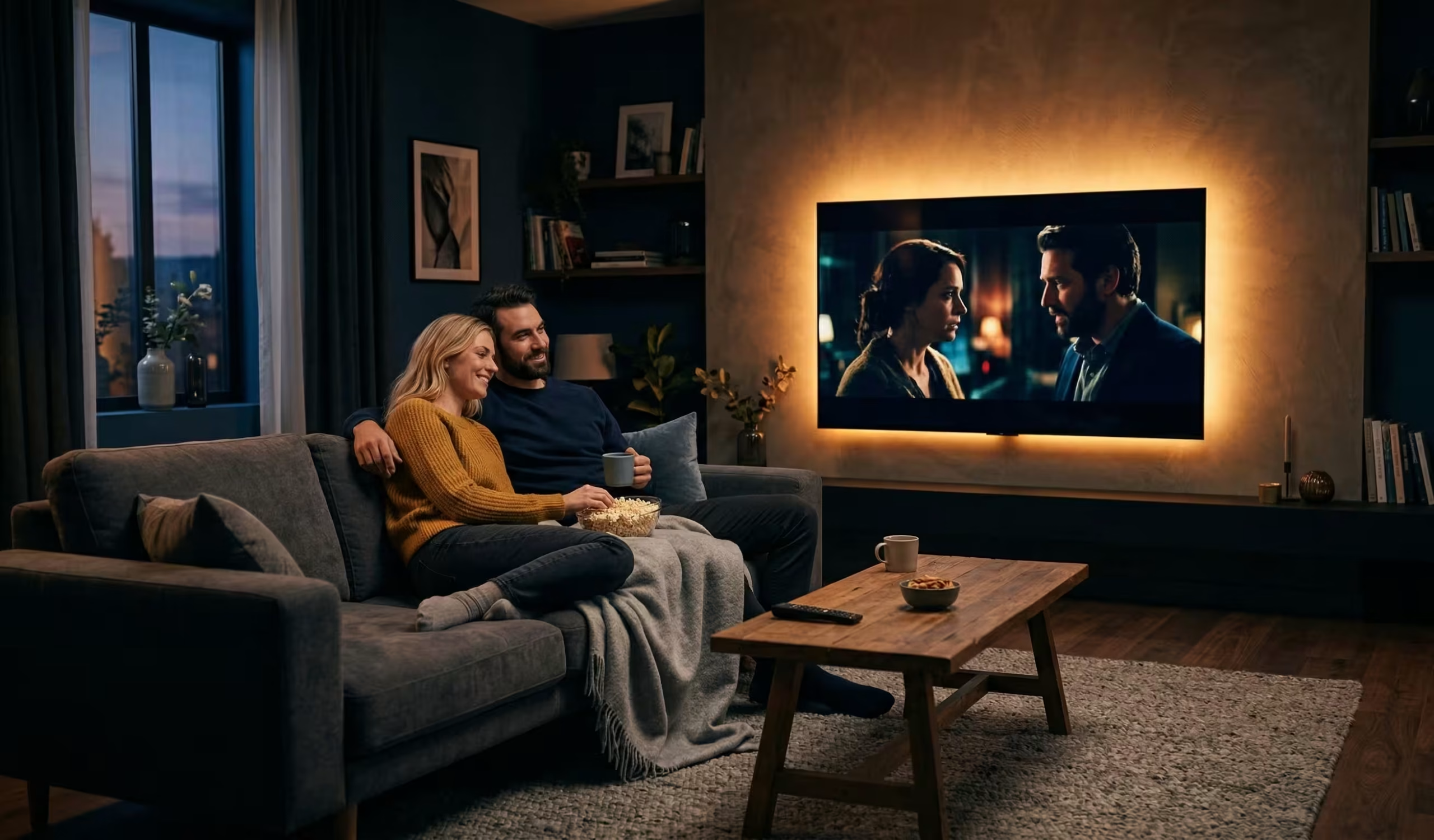
Bias lighting is the simple practice of placing a light source directly behind your television or monitor, illuminating the wall behind the screen without shining any light directly toward your eyes or reflecting off the screen itself.
This creates a soft halo of ambient light around the television. Because the wall behind the TV is now gently illuminated, your room is no longer pitch black. This provides a baseline level of light that prevents your pupils from dilating completely. When the bright explosion happens on screen, the contrast between the TV and the surrounding wall is significantly reduced. Your eye muscles no longer have to violently contract, eliminating the fatigue entirely.
As an added bonus, bias lighting plays a visual trick on your brain. By surrounding the screen with a subtle light, the black levels on your television will actually appear deeper and richer than they did before. It is a win for both your health and your picture quality. To get this right without making your living room look like a neon nightclub, follow our professional guide on installing LED backlighting on your TV the right way.
Simple Menu Adjustments to Make Your Television Safer for Nighttime Viewing
Adding bias lighting is the best physical upgrade you can make, but you also need to address the settings inside the television itself. When you buy a TV at a big box store, it is almost always set to “Retail Mode” or “Vivid Mode.”
These settings push the brightness, contrast, and color saturation to their absolute maximum limits. Manufacturers do this so the TV stands out under the harsh fluorescent lights of a massive warehouse store. Leaving your television on Vivid Mode in a dark living room is the visual equivalent of staring directly into the headlights of an oncoming car.
You need to dive into your settings menu and take control. First, switch the picture profile to “Movie,” “Cinema,” or “Filmmaker Mode.” These modes automatically lower the artificial sharpness and bring the colors back to natural, intended levels.
Next, you must learn the difference between “Brightness” and “Backlight” in your menu. Adjusting the Brightness often ruins the black levels of the image. Instead, you want to lower the Backlight setting. Turning the backlight down by twenty or thirty percent will drastically reduce eye strain without destroying the picture details. For a complete walkthrough of this process, check out our tutorial on how to calibrate your TV for optimal picture quality.
Using Smart Home Automation to Create the Perfect Viewing Environment Automatically
The ultimate goal of home technology is convenience. You should not have to manually adjust your television menus and plug in specialized lamps every time you want to watch a movie.
By integrating smart home technology, you can protect your eyesight with a single voice command or the touch of a button. We frequently program “Movie Night” scenes for our clients. When activated, the system automatically lowers the motorized window shades to block out streetlights, turns off the harsh overhead kitchen lights, and dims the living room lamps to a warm fifteen percent.
Most importantly, the system turns on the bias lighting behind the television to a soft, warm white color temperature (ideally around 6500K) to perfectly balance the screen.
Protecting your vision does not mean you have to watch movies in a brightly lit room that ruins the cinematic mood. By understanding how your eyes process light, treating the wall behind your screen, and taking control of your television settings, you can enjoy endless movie marathons in complete, luxurious comfort.