Why Your New $2,000 TV Looks Like a Cheap Soap Opera and How We Can Restore the Cinematic Experience
You have just spent a small fortune on a flagship 4K television. You unbox it, mount it carefully on the wall, and dim the lights. You fire up a classic film like The Godfather or a modern blockbuster like Dune, expecting a theater-quality experience.
But something is wrong.
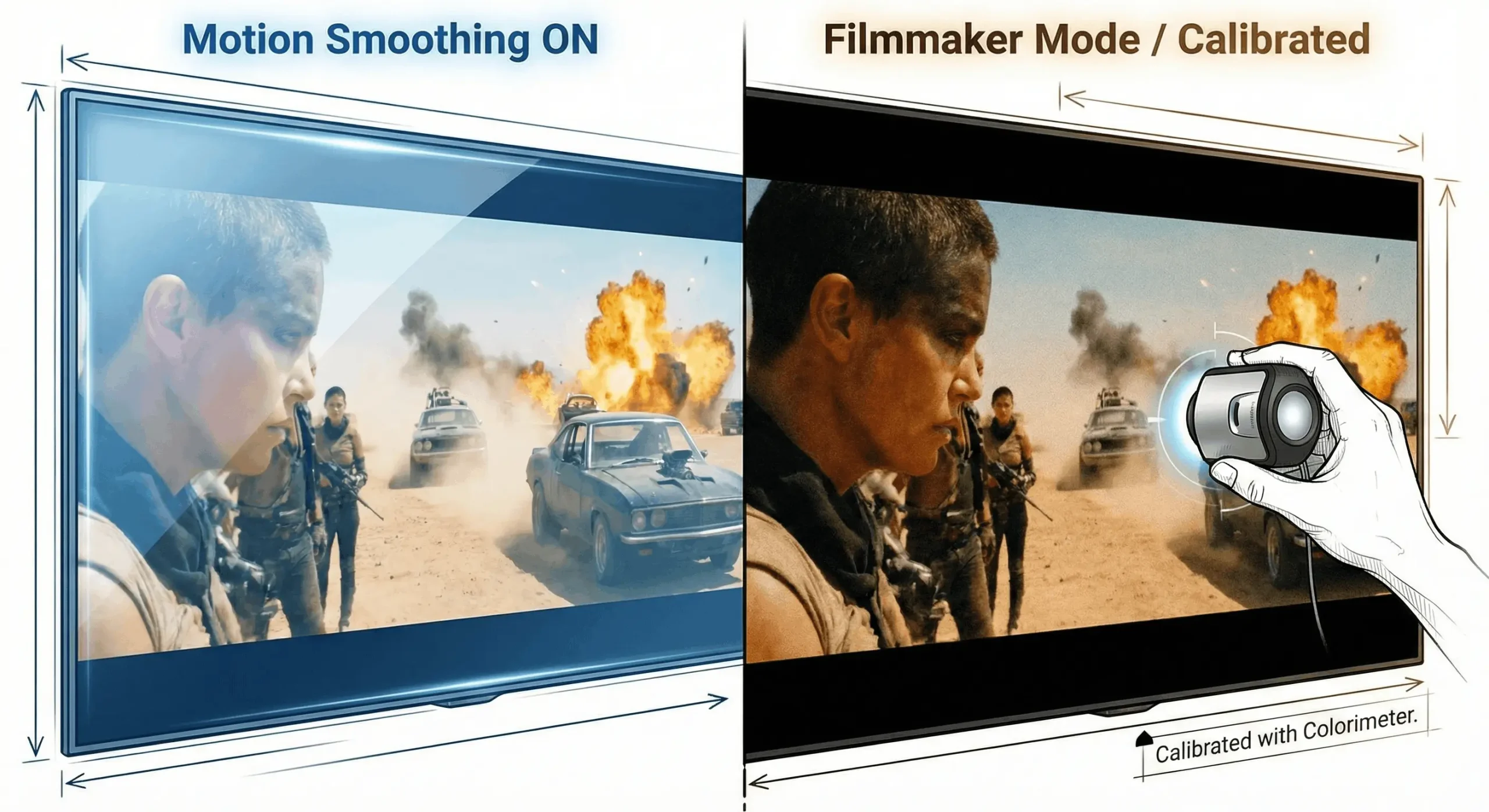
The image is sharp, certainly. But the movement feels… wrong. When the actors move across the screen, they don’t look like film stars. They look like they are moving too fast, or too fluidly. The grandeur of the cinema is gone, replaced by the hyper-realistic, cheap aesthetic of a daytime soap opera or a behind-the-scenes documentary.
You are not imagining this. You are a victim of the “Soap Opera Effect.”
As a professional video calibrator, I see this tragedy in almost every home I visit. Your television is lying to you. It is taking the art of cinema and processing it into digital mush. The good news is that your TV is not broken; it is simply misconfigured. Here is why this happens and how we fight back to restore the director’s intent.
Manufacturers Enable Motion Smoothing to Win the War on the Showroom Floor
To understand why your TV looks this way, we have to look at the technology known as Motion Interpolation (or Motion Smoothing).
Technically, this feature was designed for sports. A football game is broadcast at 30 or 60 frames per second (fps) and involves fast, chaotic movement. To reduce blur and keep the ball sharp, TV manufacturers created algorithms to artificially boost the frame rate.
However, manufacturers enable this feature by default for all content, not just sports. Why? Because of the “Showroom Floor” mentality. In a brightly lit Best Buy or Costco, the TV that looks the brightest and the “smoothest” draws the eye of the casual shopper. Accuracy does not sell TVs in a retail store; “pop” does. So, they ship the TV with every enhancement cranked to maximum.
Motion Interpolation Destroys the Cadence of 24 Frames Per Second Cinema
The problem arises when you apply sports processing to movies. For nearly 100 years, films have been shot at 24 frames per second. This specific frame rate is what our brains associate with “storytelling” and “dream states.” It has a natural, slight stutter (judder) that creates the cinematic texture we love.
When you watch a 24fps movie on a modern TV running at 120Hz with Motion Smoothing turned on, the TV’s processor panics. It sees gaps between the real frames.
To fill these gaps, the TV invents new frames that never existed. It analyzes Frame A and Frame B, calculates what the movement should look like in the middle, and generates a fake Frame A.5.
The Result Is Visual Heresy
This artificial smoothing creates two major issues:
- The Soap Opera Effect (SOE): By smoothing out the natural 24fps stutter, the image becomes hyper-fluid. It removes the barrier between the audience and the set. Instead of watching a character in a movie, you feel like you are standing on the set watching an actor recite lines. The suspension of disbelief is shattered.
- Digital Artifacts: The processor is guessing. When action is fast—like a sword fight or an explosion—the TV guesses wrong. This results in “halos,” tearing, or pixelated glitches around moving objects.
You Can Fix This Immediately by Engaging Filmmaker Mode
For years, Hollywood directors like Martin Scorsese, Christopher Nolan, and Tom Cruise fought against these settings. Their advocacy led to the creation of “Filmmaker Mode” (or its equivalent) on modern displays. This mode sends a signal to the TV to disable all post-processing and motion smoothing, respecting the original frame rate.
Here is how to rescue your picture on the major brands:
LG (OLED and NanoCell)
Go to Settings > Picture > Select Mode. Scroll until you find Filmmaker Mode. If your model is older, go to Picture Options > TruMotion and set it to Off.
Samsung (QLED and Neo QLED)
Samsung hides this deep in the menu. Go to Settings > Picture > Expert Settings > Picture Clarity Settings. By default, this is set to “Auto.” Switch it to Off.
Sony (Bravia)
Sony calls their technology “Motionflow.” Go to Settings > Display & Sound > Picture > Motion. Set Motionflow to Off or Custom (with the smoothness slider set to 0). Sony’s “Cinemotion” setting should be set to High or Auto to handle the 24p cadence correctly without adding artificial smoothing.
Professional Calibration Goes Far Beyond Simple Menu Settings
Disabling the Soap Opera Effect is the first step, and it costs you nothing. It stops the TV from actively damaging the picture. However, if you are a true enthusiast who wants to see exactly what the director of photography saw in the mastering suite, “settings” are not enough.
This is where SmartHome Connect enters with Professional Video Calibration. There is a massive difference between a TV that is “correctly set” and a TV that is “calibrated.”
Every Panel Is Unique and Requires Specialized Measurement
You cannot simply copy “best settings” from a forum or a YouTube video. Due to manufacturing tolerances, two OLED TVs that rolled off the assembly line on the same day will have slightly different color outputs.
To calibrate a display, we use a colorimeter (a specialized sensor) and a pattern generator. We hang the sensor on your screen and feed it thousands of specific color patches to measure exactly how your TV behaves.
| Metric | Factory Settings (Out of Box) | Professional Calibration |
|---|---|---|
| White Balance | Too Blue. Manufacturers push blue light to make the TV look brighter in stores. This washes out skin tones and causes eye fatigue. | D65 (6500 Kelvin). We align the white point to the industry standard of daylight, restoring natural, warm skin tones and snowy whites. |
| Gamma Curve | Crushed or Washed Out. Shadow details are often lost in black “crush,” or dark scenes look milky grey. | Linear Tracking. We adjust the EOTF (Electro-Optical Transfer Function) so you see detail in the shadows of a Batman movie without turning blacks into grey. |
| Color Accuracy | Oversaturated. Grass looks neon green; a Coke can looks radioactive red. | Reference Standard. We map the colors so that “Leaf Green” and “Sky Blue” are mathematically accurate to the source material. |
You Deserve to See the Film, Not the Television’s Processor
When you buy a high-end television, you are buying a canvas. But out of the box, that canvas is painted over with digital graffiti. Motion smoothing destroys the temporal texture of the film, and a cool white balance destroys the color palette.
Turn off the motion smoothing today. You will likely find the picture “stuttery” for about 20 minutes as your brain readjusts to the lower frame rate. But once you settle in, the magic will return. The barrier will disappear, and you will be back in the cinema.
Are you ready to unlock the full potential of your home theater?
At SmartHome Connect, we bring Hollywood reference standards to your living room. Contact us to schedule a full ISF-level calibration and stop watching a soap opera.