Why Your Historic Kansas City Home is Killing Your Gigabit Connection (And How to Fix It)
It is a Saturday evening in Brookside. You have settled into the living room of your 1925 Kansas City Shirtwaist. The woodwork is original, the oak floors are gleaming, and you’ve finally finished restoring the crown molding. You fire up Netflix to stream a movie in 4K.
And then, the spinning wheel of death appears.
You check your phone. One bar of WiFi. You run a speed test: 15 Mbps.
This makes no sense. You pay for Google Fiber’s 2 Gig plan. You have one of the fastest internet connections in the United States piping directly into your basement. Yet, in your second-floor master bedroom or your back sunroom, you are getting speeds reminiscent of a dial-up connection in 1999.
As a Network Architect specializing in residential retrofits, I see this scenario every single week. From the brick Tudors of Hyde Park to the colonial revivals of Waldo, Kansas City’s most charming historic homes are essentially hostile environments for modern wireless technology.
The problem isn’t your ISP. The problem isn’t usually your router. The problem is that your home was built to last for centuries, and in doing so, it was inadvertently built to destroy radio frequencies.
Here is the technical reality of why your historic home is killing your gigabit connection, why the “easy fixes” you buy at Best Buy won’t work, and how we fix it without destroying the history you love.
The Physics of Plaster: Living Inside a Faraday Cage
To understand why your WiFi fails, we have to look at the construction materials of the 1920s and 30s.
Modern homes are built with drywall (gypsum board) and 2×4 wooden studs. Drywall is effectively invisible to WiFi signals. A 5GHz wave passes through it with minimal attenuation (signal loss).
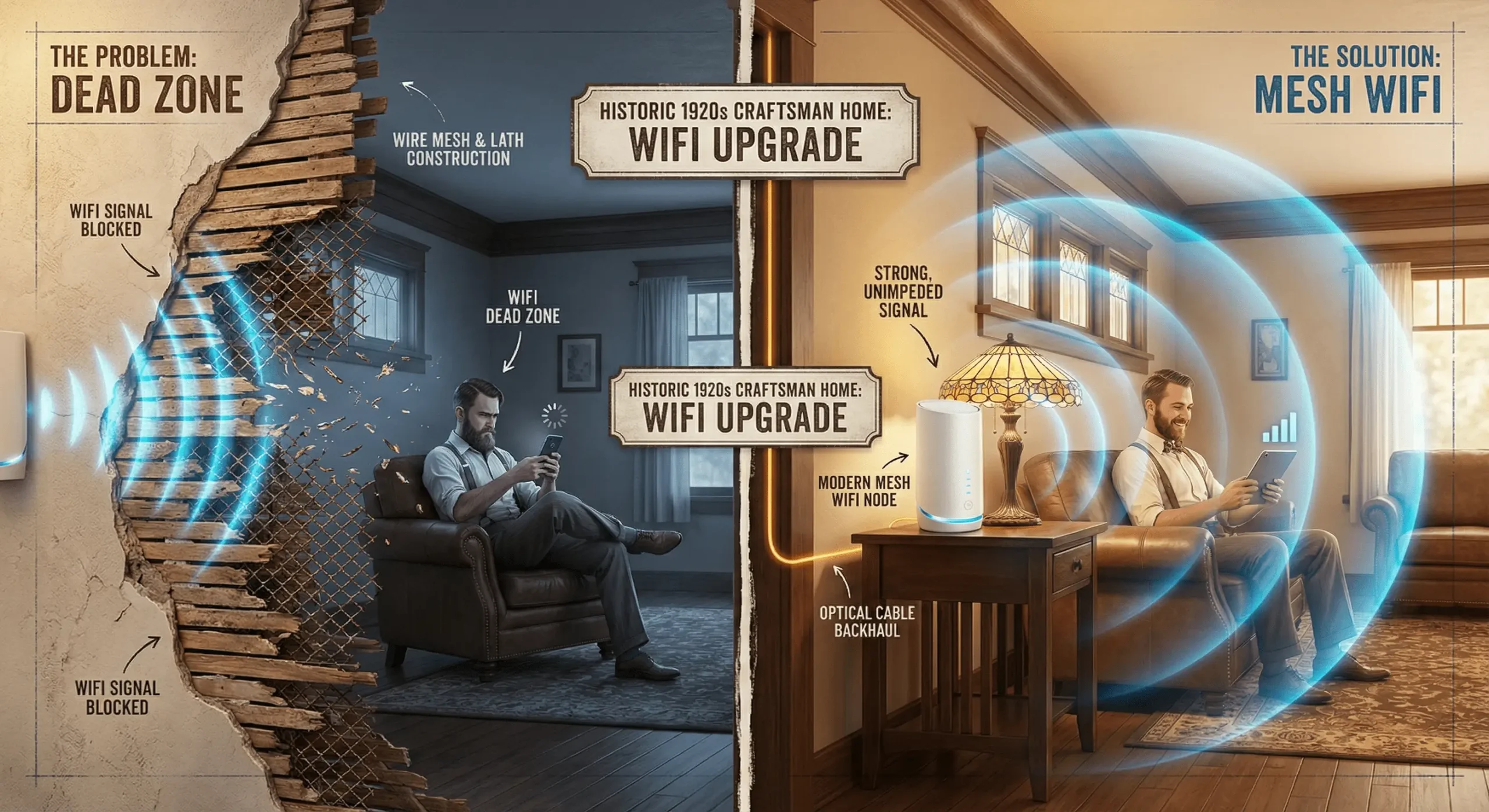
Your home, however, is likely built with lath and plaster.
In the early 20th century, builders nailed horizontal strips of wood (lath) across the studs. They then troweled wet plaster over these strips. To strengthen corners, archways, and sometimes entire walls, they used a hidden ingredient: metal wire mesh.
This wire mesh is the assassin of modern connectivity.
In physics, a mesh of conductive material (metal) used to block electromagnetic fields is known as a Faraday Cage. When you try to push a WiFi signal through a wall reinforced with wire mesh, the metal absorbs and scatters the radio waves.
The Frequency Problem
This issue is compounded by the evolution of WiFi speeds.
- 2.4 GHz: Older WiFi operates on a lower frequency. These waves are longer and can penetrate solid objects somewhat effectively. However, the 2.4 GHz spectrum is crowded (microwaves, baby monitors, neighbors) and slow.
- 5 GHz & 6 GHz (WiFi 6/6E/7): To get the gigabit speeds you pay for, modern routers use higher frequencies. These waves carry massive amounts of data, but they are physically fragile. They have poor penetration power.
When a 5 GHz wave hits a plaster wall with metal lath, the signal attenuation is catastrophic.
Ltotal = Lfreespace + Lobstacle
Where Lobstacle for a standard drywall interior wall might be 3dB, a plaster wall with metal mesh can exceed 15dB to 20dB of loss. Since the decibel scale is logarithmic, a loss of 3dB represents a halving of signal power. A 20dB loss means your signal is being reduced to 1% of its original strength after passing through just one wall.
If your router is in the front hallway and you are in the back kitchen, that signal has to pass through three or four plaster walls. Mathematically, the signal doesn’t stand a chance.
The Extender Trap: Why “Boosters” Don’t Work
The most common reaction to this problem is to buy a “WiFi Extender” or “Booster”—those small devices you plug into an outlet halfway between your router and the dead zone.
In a drywall home, these are mediocre. In a historic KC home, they are useless.
1. The Repeater Effect (Halving Your Bandwidth)
Most extenders are “half-duplex” devices. They cannot send and receive data simultaneously. They must listen to the router, stop, and then shout the message to your device.
Throughputextender ≈ ½ × Throughputsource
This immediately cuts your potential speed in half. If you are paying for 2 Gig internet, the best theoretical speed you could get off a single-band extender is drastically lower—and that’s before we account for interference.
2. Garbage In, Garbage Out
This is the fatal flaw. An extender needs a strong signal to extend.
- If you place the extender in the kitchen (where the signal is weak) to reach the patio, the extender is trying to repeat a corrupted signal.
- If you place the extender in the dining room (where the signal is strong), the signal it broadcasts still has to punch through the plaster wall into the kitchen.
You are simply moving the bottleneck, not removing it. You are adding more noise to an already difficult radio environment.
The Solution: Mesh WiFi with Wired Backhaul
If extenders are the problem, what is the solution?
To cover a multi-story Shirtwaist or a sprawling Tudor, we need a Mesh WiFi System, but—and this is the critical distinction—it must use a Wired Backhaul.
A Mesh system consists of a main router and several “satellite” nodes placed throughout the house. These nodes communicate with each other to create a single, seamless blanket of WiFi. Your phone automatically switches to the closest node as you walk from the basement to the attic.
However, standard “Wireless Mesh” (like a basic Eero or Nest setup) creates a wireless link between the nodes. In your home, that wireless link will fail because the walls block the nodes from talking to each other.
The Gold Standard: Ethernet Backhaul
The only way to guarantee gigabit speeds in every room of a historic home is to physically connect each Mesh node to the main switch using Cat6 or Cat6A Ethernet cable.
By hardwiring the nodes, we bypass the “Physics of Plaster” entirely.
- Internet enters the home (Basement).
- Travels via Ethernet cable inside the walls.
- Emerges at a Node on the 2nd floor.
- The Node broadcasts fresh, full-speed WiFi 6/7 specifically for that room.
We stop trying to blast a signal through the Faraday cage. Instead, we pipe the data inside the cage and release it locally.
The Preservationist Geek Approach: Wiring Without Destruction
At this point, most homeowners panic. “You want to run blue ugly cables through my 100-year-old walls? I just spent $10,000 on this wallpaper.”
This is where SmartHome Connect differs from the cable guy. We are preservationists first, network engineers second.
Running cable in a historic home is an art form. We don’t rip out drywall or tack cables along baseboards. We use the anatomy of the house against itself.
1. Balloon Framing
Many Kansas City homes built before 1940 utilize “balloon framing.” Unlike modern “platform framing,” the wall studs in balloon framing often run continuous from the foundation to the attic without a break. This allows us to fish a cable from the basement all the way to the attic in a single pull, dropping down into second-floor bedrooms from above without cutting a single hole in your living room walls.
2. The Chute Strategy
Historic homes are filled with vertical voids. Laundry chutes, dead chimney cavities, and stacked closets are highways for cabling. We utilize these spaces to move data between floors invisibly.
3. Period-Correct Finishing
When we do need to mount a wireless access point (AP), we don’t just slap a blinking plastic UFO on your ceiling.
- We use low-profile, matte-white APs (like the Ubiquiti Unifi U6/U7 Pro or Alta Labs).
- We can hide APs atop kitchen cabinets or behind books on built-in shelves.
- If a faceplate is required, we match the aesthetic. No bright orange ethernet jacks.
Our goal is for the technology to be invisible. You should feel the speed, not see the wires.
Bottlenecks: Why Your Google Fiber 2 Gig Plan Feels Slow
A final note on the specific ISPs in our area. Kansas City is blessed with incredible infrastructure (Google Fiber, Spectrum Gigabit, AT&T Fiber).
However, if you subscribe to Google Fiber’s 2 Gig or 5 Gig plans, you are likely hitting a hardware bottleneck.
Standard consumer mesh routers (and even the ones provided by ISPs) often only have 1 Gigabit ports. If you plug a 2 Gigabit connection into a 1 Gigabit port, you have capped your speed physically.
Throughputmax = min(ISPspeed, Portspeed)
To truly utilize multi-gig service, you need:
- Multi-Gig Switches: Hardware that supports 2.5GbE or 10GbE standards.
- WiFi 6E or WiFi 7: These standards utilize the new 6GHz spectrum, which is the only wireless frequency capable of exceeding 1 Gigabit in real-world throughput.
At SmartHome Connect, we specify enterprise-grade equipment (Ubiquiti UniFi, TP-Link Omada) that can actually handle the firehose of data Google is sending to your house.
The Verdict
Your historic home is a masterpiece of craftsmanship. It was built to withstand tornadoes, harsh winters, and time itself. It is a fortress.
But you cannot fight physics with a $50 range extender.
If you are tired of buffering in the bedroom and dropped calls in the kitchen, stop fighting the house. Work with it. A hardwired, backhauled Mesh system is the only way to modernize your home’s nervous system without compromising its soul.
Ready to bring your 1920s home into the 2020s?
At SmartHome Connect, we specialize in the intersection of historic preservation and high-performance networking. We know what’s behind your plaster, and we know how to get your signal around it.
Would you like me to draft a specific “Site Survey Checklist” that you can use to identify potential cable paths in your own home before calling a professional?